Upgrading legacy systems without losing your sanity 🤯
Table of Contents
Ever been handed a legacy system whose dependencies haven’t been touched in a decade—and then been asked to upgrade it? Even senior developers can freeze when the codebase is unfamiliar, tests are missing, and production might break.
I’ve been involved in several such upgrades, some smooth and some painful. Here are lessons learned that can help you make the process manageable. Think of it as a survival guide. 😊
TL; DR #
Here’s how to make a complex legacy upgrade manageable.
- Understand the big picture: Identify the major components and stakeholders.
- Prepare the system: Determine the scope and build a safety net.
- Define your upgrade strategy: Analyze language and dependency changes. Identify chunks that can be upgraded individually.
- Staying sane during the process: Pause other work on the system. Keep a log of what you do. Use IDE and other tools well.
- Execute in safe increments: Favor small focused steps. Practice depth-first development. Avoid unnecessary cleanup.
- Test in safe environments: Verify changes in isolated, realistic environments.
- Declare victory (carefully): When done, monitor for stability, and clean up.
Understand the big picture #
Map the system first. Identify the major components and what they depend on—databases, batch jobs, integrations. What parts are public-facing and which are internal?
Identify stakeholders. Who depends on the system? Who are the customers, internal or external? Keep a line of communication with them, so they know what to expect.

Assess criticality. Which parts must stay available, and where could you tolerate downtime? Is there an SLA? Are any IP addresses publicly disclosed? You won’t discover everything, but early discovery can prevent major problems later.
Prepare the system #
Get rid of unused code. Remove anything that is not needed. You don’t want to spend time upgrading dead code. Now is the time to kill that three-year-old prototype that never got into production. Use your IDE’s features to identify unused code.
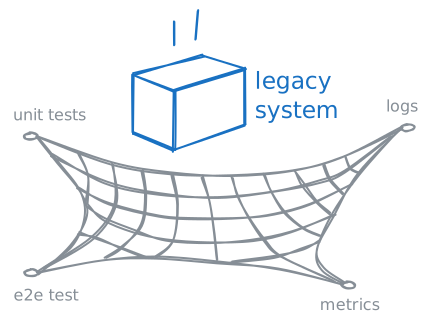
Build a safety net. Ask yourself will you’ll need to do to confidently assert that the upgraded system still works. Are there automated tests in place, unit tests or other? Even a minimal set of smoke tests can give you confidence. If coverage is thin, consider writing end-to-end tests for the most business-critical flows before starting the upgrade. Snapshot tests can also be helpful to “lock in” existing behavior.
Consider data migration. Does the upgrade require changes to the database schema or data itself? Such changes are often riskier than the code changes themselves. If the schema changes, the expand and contract pattern can be helpful.
Plan for changes in infrastructure and related artifacts such as build scripts, CI configuration, and containerization files.
Define your upgrade strategy #
By its nature, large-scale upgrades are hard to plan. Even with preparation, predicting what problems you will encounter is hard. However, if you can migrate one concern at a time, it will be much easier to keep track of your changes. Perform a big-bang upgrade only if unavoidable.

Look at the programming language and its runtime (if applicable). Compare the current versions with the latest: are there any breaking changes? Consider if it would be possible to upgrade in steps, or if a direct upgrade to the latest version is necessary.
Next, go through all dependencies of the system. Don’t forget the transitive dependencies (the dependencies of the dependencies). Are the current versions compatible with the new platform version? Are there newer versions available? Do they contain any breaking changes? Watch for abandoned libraries and plan replacements.
Identify chunks you can migrate individually. Look for natural boundaries such as APIs, databases or queues. Be mindful of cyclical dependencies. It may even be necessary to spend some time breaking them before performing the upgrade. Carefully consider the order of changes—sometimes it is easier to upgrade a library before upgrading the programming language version, sometimes after.
Consider temporary solutions. You may have to use temporary hacks or shims to get through one step. For example, creating a temporary adapter to allow code to access the upgraded component through its old interface. Consider if using feature flags can help you do gradual upgrades.
An example from an upgrade I performed that shows how you sometimes have to step outside the regular pattern. In this scenario, the compiled form of an old internal framework did not work and the source code was no longer available.
After some digging, I realized that we used very little of what is in the
xyzframework-1.0.42.jarfile. I decided to remove the jar file and instead copy the relevant source code into the project. Since we no longer have the original source code for XYZFramework available, I had to decompile the classes in the jar file. While this is not ideal, it solves the problem which I otherwise don’t know how we would have solved without a lot of rewriting.
Create a contingency plan. Make sure you have a clear rollback path if the upgrade fails. Tag the latest working commit before the upgrade, backup the database, and so on. If you know that you will not be able to go back after a hypothetical failure, make that explicit and raise the stakes accordingly.
Staying sane during the process #
If possible, pause other work during the upgrade. Upgrading an old system is challenging enough, upgrading a moving target is even more complex. If that is not possible, perform the upgrade on a separate branch and rebase it on the main branch often.
Keep a log of what you do. Write down each step you take and why. Write down each error that occurs, and when you solve it, write down what caused it and how you solved it. The upgrade log acts as a “rubber duck” that helps you take a step back and look at the upgrade from a distance. It also helps you solve problems if they reappear, or even troubleshoot related issues in the future. Store the log in your repo as a Markdown file.

Make good use of your IDE and other tools, they can often do basic rewriting or migration. (For example, in one upgrade I used the JBoss/Wildfly server migration tool to update 10-year-old application server config.) Learn to use regular expression search to find potential matches for things you need to change. Consider using AI for making large-scale boilerplate-style changes.
Automate everything. If the migration includes changes that need to be done in the environment to be upgraded, such as making changes in the database or moving files on disk, make sure to automate it. Manual steps increase risk and make repeated rehearsals slow and error-prone. Use tools like Flyway or Liquibase for database migrations.
Avoid the temptation to comment code out temporarily to make the code compile. If you do, the compiler or IDE can no longer help you. The risk for false positives (compilation errors that you never see) increases substantially.
Execute in safe increments #
Favor small, incremental steps. Always strive to get back to a compiling state. After each error you fix, make a commit. Practice depth-first development where you follow through on each task before doing any related changes. Keep a list of remaining tasks. This will help you avoid the scenario where you have 10 unrelated changes spanning 100 modified files but cannot get it to compile.
Lean on the compiler as much as your programming language allows you to. Tackle each error that the compiler throws at you one by one.
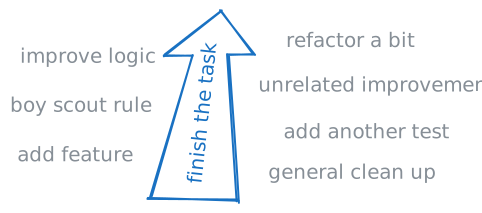
Avoid performing any cleanup or refactoring that is not strictly necessary. Don’t be tempted to make small unrelated improvements as you go. If something is ugly but stable, upgrade it first, improve it later. The “boy scout rule” does not apply at this time. Similarly, do not attempt to implement any new features or other non-technical improvements during the upgrade.
Don’t be afraid to start over. Sometimes it is easier to take a step back and try again. Because you commit often and documented each step, you don’t lose much.
Test in safe environments #
During a big upgrade, the ability to quickly create new environments is invaluable. Either from scratch, or by cloning production or a stable test environment. Ideally it should have realistic, production-like data. After each increment, you can verify changes in a test environment before moving on. In combination with automating as much as possible, it allows you to quickly rehearse the upgrade as many times as needed to get everything to work.
Running the upgrade multiple times is particularly valuable for hard-to-revert changes such as database schema migrations. You don’t want to run the big upgrade on the production server without first proving that it works in another environment. Thorough regression testing in a staging environment can help you gain confidence before the production upgrade.
When the upgrade is nearing completion, consider if you can run both the old and new systems simultaneously. The basic approach would be blue/green deployment where you start the new (green) system while the old (blue) system is handling traffic. Once the new system is verified to be healthy, traffic can be switched over.
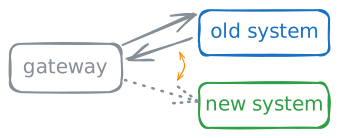
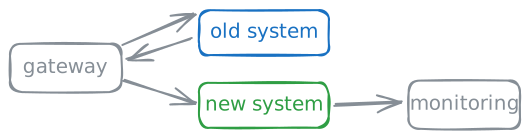
A more advanced approach is to do a “shadow deployment” where you run both the old and new systems, and feed both systems with the incoming traffic, but still serve the old system’s responses to the user. That can help you verify performance and flush out bugs in the new system before a full rollout.
Declare victory (carefully) #
When the upgraded system is finally up and running, celebrate the win! Then monitor the stability for a period of time before declaring complete victory.
Review the improvements you discovered during the upgrade. What changes would be most valuable for long-term maintainability of the codebase?
As a follow-up action, you may also want to add automated dependency scanning using tools like Dependabot or Renovate. That can help you avoid getting into this situation again some years down the road.
Once you’ve done all of the above, you are in a much better place. With automated tests and dependency scanning in place, future upgrades should be routine, not a survival exercise.